Laravel Multi-Tenant Database: Shared vs Separate

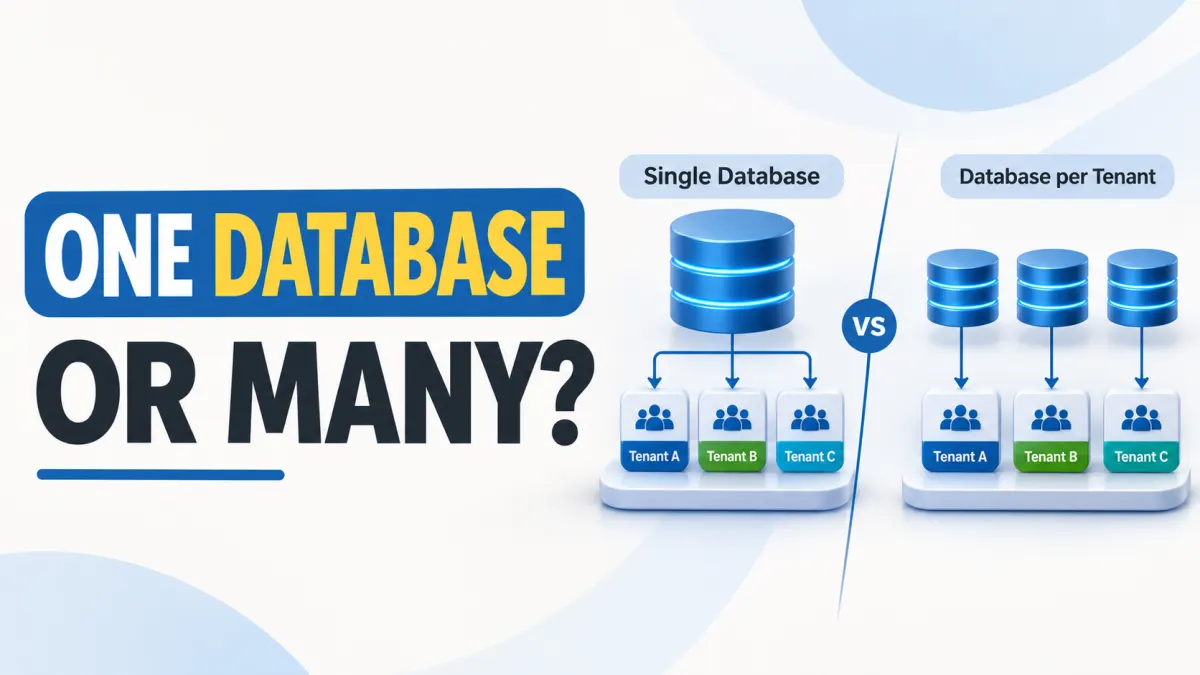
Single Database vs Database per Tenant in Laravel: What SaaS Founders Need to Know
The database model you choose today can shape tomorrow's migration costs.
When building a SaaS product with Laravel, one of the earliest architectural decisions is how to store data belonging to different customers. Should every customer share one database? Should each customer have a separate database? Or could database schemas provide a middle ground?
These approaches can all support multi-tenancy, but they differ in security boundaries, operational complexity, reporting, backup recovery and scaling options.
For a founder launching a minimum viable product (MVP), a shared database may be the simplest practical starting point. For a platform with customers requiring independent data restoration or infrastructure, separate databases may be worth the additional operational work.
Neither approach is automatically more secure, faster or more scalable in every situation.
This guide explains Laravel multi tenant database architecture using practical examples, including the tradeoffs developers should understand before choosing a model or purchasing SaaS source code.
Explain tenancy models
Multi-tenancy means a single software application serves multiple customers, called tenants, while controlling which data and resources each tenant can access.
A tenant might represent a business, organization, school, agency or workspace. One tenant can have multiple users, and a user might belong to more than one tenant.
Consider a hypothetical project-management SaaS called TaskNest. Two companies, Acme Studio and Northstar Digital, use the same Laravel application.
Each company creates projects, invites team members and manages tasks. Although both companies use the same application code, neither should be able to access the other's private projects.
There are three common ways to organize the underlying database.
1. Shared database with tenant_id
In a shared-database model, all tenants use the same database and typically the same tables.
A column such as tenant_id identifies the customer that owns each record.
Hypothetical example:
| id | tenant_id | project_name |
|---|---|---|
| 101 | acme | Website Redesign |
| 102 | northstar | Mobile App Development |
| 103 | acme | Brand Guidelines |
All three projects exist in one projects table.
When an Acme Studio employee opens the project dashboard, Laravel must retrieve only records belonging to Acme Studio.
A simplified Eloquent query could look like this:
Project::query()->where('tenant_id', $authorizedTenantId)->get();
Here, $authorizedTenantId must come from trusted, server-side tenant resolution and membership verification. It must not simply be accepted from a user-controlled request parameter.
Laravel's Eloquent global scopes can help apply recurring query constraints. However, global scopes do not automatically protect raw SQL, every relationship, background task or reporting query. They can also be explicitly removed in application code.
A reliable shared-database implementation needs consistent tenant filtering, model authorization and appropriate database constraints.
For example, if two tenants can each create a project with the slug website-redesign, a composite unique index on tenant_id and slug may be more appropriate than making slug globally unique.
Advantages
One database to provision and manage.
A common schema and migration process.
Simpler authorized platform-wide aggregation.
A practical starting point for products with many small tenants and similar requirements.
Tradeoffs
Missing or incorrect tenant filters can expose another tenant's records.
Heavy workloads from one customer can affect others sharing the same database resources.
Restoring only one customer's data requires special procedures.
Moving a customer to a dedicated database later involves extracting and validating related records.
A shared database reduces some infrastructure complexity, but it makes correct application-level tenant isolation particularly important.
2. Separate database for every tenant
In a database-per-tenant architecture, each customer has a dedicated logical database.
The Laravel application can still use one shared codebase, but database connections are selected according to the authenticated tenant.
Hypothetical example:
TaskNest maintains a central database containing tenant identities, domain mappings and database connection references.
Customer-specific data is stored separately:
tasknest_acmecontains Acme Studio's projects and tasks.tasknest_northstarcontains Northstar Digital's projects and tasks.
When an authorized Acme user signs in, the application resolves Acme's tenant identity and selects its configured database connection.
Laravel supports multiple database connections. For example:
DB::connection('tenant_acme')->table('projects')->get();
This is a simplified example of a connection that has already been safely configured. A production application needs a trusted tenant-to-connection mapping, secure credential management and connection lifecycle controls.
Advantages
Customer data resides in separate logical databases.
Per-customer exports and database-level restoration workflows can be easier to organize.
Different tenants can potentially be assigned to different database servers.
Database credentials and permissions can provide additional isolation boundaries.
Tradeoffs
Provisioning, credentials, migrations and monitoring must operate across many databases.
Connection management becomes more complicated as the tenant count grows.
Platform-wide analytics need cross-database collection or aggregation.
Operating many small databases may create unnecessary overhead.
Importantly, a database per tenant does not necessarily mean a server per tenant. Multiple databases may still share the same server, storage and infrastructure.
It also does not eliminate application authorization risks. Selecting the wrong tenant connection or incorrectly handling user permissions can still cause data exposure.
3. Shared database with schema-based separation
A third model uses one database with a separate schema for each tenant.
This distinction is particularly relevant to PostgreSQL, where schemas act as namespaces for tables and other database objects.
For example:
tenant_acme.projectstenant_northstar.projects
Both tables exist within one PostgreSQL database but belong to different schemas.
The Laravel application must ensure that queries resolve to the correct tenant schema. This may involve schema-qualified table references or carefully managed connection settings.
PostgreSQL's search_path determines how unqualified table names are resolved. Its behavior, permissions and associated security considerations are documented in the official PostgreSQL schema guide.
Important database distinction: MySQL treats CREATE SCHEMA as a synonym for CREATE DATABASE. Therefore, PostgreSQL-style schema-per-tenant separation should not be assumed to work identically in a MySQL application.
Schema-based tenancy can offer useful organizational separation without creating a completely independent database for each customer.
However, it introduces its own complications around permissions, schema selection, migrations, database tooling and backups.
It is not automatically a compromise that delivers all the benefits of both other models.
Architecture comparison at a glance
Figure 1: Laravel multi-tenancy database patterns
The accompanying architecture diagram illustrates three conceptual arrangements:
Shared tables: Laravel application → One database → Records identified by tenant_id.
Separate databases: Laravel application → Tenant routing → Database A or Database B.
Separate PostgreSQL schemas: Laravel application → One PostgreSQL database → Schema A or Schema B.
Diagram note: These are general architectural examples. They do not depict a particular commercial starter kit.
Database architecture decision table
| Architecture | Isolation | Complexity | Backup strategy | Reporting | Suitable use cases |
|---|---|---|---|---|---|
| Shared database with tenant_id | Logical row-level separation enforced through application and database controls | Low to moderate operational complexity; careful authorization required | Whole-database backups; selective tenant restoration needs custom extraction and validation | Usually straightforward for authorized cross-tenant SQL aggregation | MVPs, standardized B2B SaaS, products with many small tenants |
| Database per tenant | Separate logical databases; stronger boundaries possible with distinct credentials and infrastructure | High as database counts and operational requirements grow | Database-specific logical backups; coordinate with server snapshots and recovery procedures | Requires querying multiple databases or consolidating data | Customers needing distinct data operations, dedicated infrastructure or independent migrations |
| Schema per tenant (PostgreSQL) | Separate schema namespaces and configurable privileges within one database | Moderate to high; schema routing and migrations need care | Schema-specific logical exports may be possible; dependencies and recovery must be tested | Cross-schema queries or centralized reporting pipelines | PostgreSQL applications that benefit from separate namespaces without independent databases |
The table describes typical design characteristics, not measured performance results or guaranteed security outcomes.
Isolation tradeoffs
Data isolation is not simply a question of whether customer records live in different tables or databases.
It is also about which users, processes and services can access those records.
A useful way to assess isolation is to consider three layers.
Application-level isolation
Application-level isolation controls which tenant's records are retrieved and which operations an authenticated user may perform.
In Laravel, this typically involves tenant identification, authenticated membership checks, query constraints and authorization policies.
For example, TaskNest might resolve the current workspace from a subdomain. However, recognizing acme.example.com is not sufficient on its own.
Laravel must also verify that the authenticated user belongs to Acme and is authorized to perform the requested operation.
A user who changes a project ID in an API request must not gain access to another company's project.
Laravel's authorization policies help organize permissions for operations such as viewing, updating and deleting model resources.
Developers should pay particular attention to:
Queries that bypass normal Eloquent model scopes.
Model relationships and nested resources that could reference another tenant.
Queued jobs and scheduled tasks that need tenant context.
File storage paths, cache keys, search indexes and exports.
Administrator features that intentionally operate across tenants.
API endpoints where resource IDs are supplied by users.
Practical rule: Identify the tenant using trusted application context, verify user membership, and authorize access to the specific resource being requested.
Database-level isolation
A separate database can create an additional boundary around customer records, especially when each database uses restricted credentials.
However, that protection depends on the actual configuration.
If the application uses a highly privileged database account that can read every tenant database, an error in connection selection or application authorization may still expose data.
Likewise, PostgreSQL schema separation depends on privileges, connection settings and the handling of search_path.
For teams using PostgreSQL shared tables, Row-Level Security may provide an additional database-enforced policy layer. It requires explicit policy design and testing; it is not a default feature of Laravel tenancy.
Database separation should therefore be treated as one part of the security design, not a substitute for authorization.
Connection management and operational complexity
Connection management becomes increasingly important in database-per-tenant and schema-per-tenant systems.
A typical request may require the application to:
Identify the tenant from trusted request information.
Authenticate the user and verify tenant membership.
Resolve the correct database connection or schema.
Execute queries using the intended tenant context.
Clear or safely reset that context before processing another tenant's work.
This is especially relevant to long-running processes and queue workers, where state or connections may be reused.
A multi-database design may also require connection pools, credential rotation, database provisioning and monitoring for each tenant or database group.
The number of tenants alone does not determine the best architecture. Query volume, concurrent connections, data size, workload variation and infrastructure limits also matter.
Scaling considerations
A shared database may scale well when tables are properly indexed, queries are optimized and infrastructure capacity is managed.
Read replicas, caching, partitioning and other techniques may help specific workloads, although each introduces its own implementation requirements.
A separate-database architecture offers more options for assigning demanding customers to dedicated infrastructure. However, it also increases the number of databases that need coordinated maintenance and monitoring.
A schema-per-tenant system keeps multiple tenants inside one database while creating separate namespaces. It does not, by itself, eliminate contention for shared database resources.
Hypothetical scenario:
Imagine TaskNest initially serves small creative agencies with similar project-management workloads.
A shared database may be sufficient because customers have comparable requirements and the development team can enforce tenant scoping consistently.
Later, a large enterprise customer requests its own database maintenance window, separate recovery procedures and dedicated infrastructure.
A database-per-tenant arrangement may make those requirements easier to address.
Neither example proves that one design will perform better. It demonstrates how different customer requirements can change the architectural decision.
Reporting and backups
Database architecture directly affects how a SaaS business produces reports, recovers from mistakes and responds to customer data requests.
These operational details are easy to overlook during MVP development.
Cross-tenant reporting
SaaS operators often need platform-wide metrics such as:
Active organizations and subscriptions.
Projects or transactions created across the platform.
Storage consumption by tenant.
Usage trends and feature adoption.
Revenue or billing summaries, where applicable.
In a shared-database model, authorized reporting processes can aggregate records from common tables using tenant_id.
For example, a platform administrator might count projects by tenant without opening each customer's dashboard.
This must be a deliberately privileged reporting operation, not a query that ordinary tenant users can access.
In a database-per-tenant model, reports may need to query each database individually or collect approved metrics into a central reporting system.
A common approach is to build a reporting pipeline that extracts permitted information from tenant databases and stores it in a separate analytics environment.
Schema-per-tenant reporting has similar considerations. Queries may span multiple schemas, or data may be collected through a reporting pipeline.
For all three models, teams should consider data minimization, reporting permissions, query consistency and the potential impact of analytical workloads on production systems.
Backup and restoration strategies
Backing up data and restoring a customer's data are related but different operations.
A database backup protects recoverable information. A restoration process determines how that information can be recovered without damaging unrelated data.
Shared database
A whole-database backup can protect records belonging to every tenant.
However, suppose an Acme administrator accidentally deletes important project records while Northstar employees continue making changes.
Restoring the entire database to an earlier point could undo legitimate changes belonging to Northstar and other tenants.
A safer tenant-specific recovery procedure may require restoring a backup into a temporary environment, extracting Acme's relevant records and carefully reconciling them with the live system.
That process must account for relationships, identifiers, attachments and changes made after the backup.
Database per tenant
With separate databases, logical backups can be organized for individual tenants.
For MySQL, utilities such as mysqldump can export one or more databases.
This may simplify individual database recovery workflows, but it does not automatically provide independent point-in-time recovery for every tenant. Snapshot and recovery granularity depend on the database engine, infrastructure and backup service.
Schema per tenant
PostgreSQL's pg_dump supports selecting particular schemas for a logical export.
However, the PostgreSQL documentation cautions that a schema-specific export may omit external dependencies needed for successful restoration.
Therefore, exporting one schema should not be treated as proof that it can be independently restored.
What a reliable backup plan should answer
Regardless of the architecture, ask:
How frequently are backups taken, and how long are they retained?
Are backups encrypted and protected by appropriate access controls?
Is point-in-time recovery available in the chosen deployment?
How are files and object storage backed up alongside database records?
Can one tenant be restored without overwriting another tenant's current data?
Have full and selective restores been tested in a non-production environment?
Two additional terms are useful.
Recovery Point Objective (RPO): The maximum acceptable period of data loss after an incident.
Recovery Time Objective (RTO): The target duration for restoring the affected service.
These targets must be established and tested. Choosing a database architecture does not guarantee them.
Migration considerations
A database model that fits a new SaaS business may need to change as the product grows.
Moving from a shared database to separate databases is possible, but it should be treated as a controlled data migration rather than a simple configuration change.
What makes tenant migrations difficult?
In shared-database systems, tenant-owned information may be spread across many related tables.
A project may have tasks, comments, uploaded files, activity records and team permissions. All relevant dependencies must move together.
Some records may also be shared globally, such as subscription plans or platform-wide configuration. Others may belong to users who have memberships in multiple tenants.
The difficult questions include:
Which records belong exclusively to one tenant?
Which records are shared between tenants or globally managed?
Can foreign-key relationships be preserved?
Are IDs globally unique or only unique within one tenant?
What happens to jobs and requests that arrive during migration?
How will reporting, backups and integrations locate migrated data?
A migration plan should answer these questions before data is moved.
A practical migration process
Step 1: Inventory tenant-owned data
Identify every table, relationship, attachment and background process connected to the tenant.
Document shared records that must remain in the central database.
Step 2: Strengthen tenant ownership rules
Audit the shared database for missing tenant references, incorrect relationships and potential cross-tenant records.
Resolve ownership ambiguities before extracting customer data.
Step 3: Prepare the destination
Create the target database, apply the appropriate schema migrations, configure restricted access and prepare monitoring.
Laravel's database migrations provide a way to version database schema changes, but tenant-specific migration orchestration must be designed for the selected architecture.
Step 4: Export and transfer consistent data
Choose a migration method that accounts for concurrent writes.
Depending on the application, this may involve a maintenance window, a consistent database snapshot, a change-capture process or a carefully controlled dual-write strategy.
Dual writes create additional consistency risks and should not be introduced casually.
Step 5: Validate the result
Compare record counts, relationships and relevant checksums or business totals.
Test authentication, authorization, file access, background jobs and tenant-specific workflows.
A matching row count alone does not prove that the migration succeeded.
Step 6: Cut over the tenant
Update the trusted tenant registry or connection mapping so new requests use the destination database.
Ensure that active workers, scheduled jobs and caches no longer operate against outdated tenant data.
Step 7: Monitor and retain a rollback plan
Verify application behavior and establish an explicit recovery procedure before removing the original records.
Rollback becomes more difficult once the destination has accepted new writes, so the rollback strategy must account for those changes.
What about migrating every tenant's schema?
Shared-database applications often have a comparatively centralized database migration process.
Database-per-tenant systems may need to apply the same schema change across many customer databases.
Schema-per-tenant systems also need a reliable way to manage changes across their tenant schemas.
Teams should plan for failures, partially completed deployments, schema-version tracking and backward-compatible application releases.
A migration that succeeds for one tenant must not be assumed to succeed for every tenant.
Can a SaaS use a hybrid model?
Yes. A hybrid architecture can keep some tenants in shared infrastructure while placing others in dedicated databases.
Hypothetical example:
TaskNest stores smaller customer workspaces in its shared database. A handful of enterprise customers are assigned independent databases because their operational requirements differ.
This can provide flexibility, but the application must support more than one data-access model.
The additional routing, reporting, migration and testing complexity may outweigh the benefit for a small team.
A hybrid approach is worth considering when specific customer needs justify it, rather than adopting it simply because it appears more advanced.
A decision checklist for SaaS founders
Before choosing a database model, evaluate the following.
| Question | Why it matters |
|---|---|
| Will most tenants have similar workloads and data structures? | Shared tables may be easier to maintain when tenants have consistent requirements. |
| Do customers need independent restoration or database operations? | Separate databases may simplify certain customer-specific procedures. |
| How will cross-tenant reports be generated? | Shared tables make some aggregation easier; separate databases need additional collection methods. |
| Does the team have capacity to manage many databases? | Provisioning, monitoring, credentials and migrations create recurring work. |
| Will particular customers require dedicated infrastructure? | Separate databases can facilitate infrastructure-level allocation. |
| Which database engine is being used? | PostgreSQL schemas and MySQL databases have different semantics. |
| Can the application safely change tenancy models later? | Tenant-aware data models and clear ownership boundaries can reduce migration difficulty. |
The best decision is the one that meets current requirements while keeping realistic future changes manageable.
Vendor questions
Purchasing a Laravel SaaS starter kit can save development effort, but founders should understand the database architecture before buying.
A product described as multi-tenant might use shared tables, separate databases, schemas or a customized combination.
The term alone does not establish which model is implemented or how tenant access is protected.
Ask a code vendor the following questions.
Database design and tenant security
1. Which tenancy architecture does the current release use?
Ask whether tenant records share tables with tenant_id, live in separate databases or use another form of separation.
2. How is the current tenant identified and verified?
Understand how domains, workspaces, authenticated users and membership checks interact.
3. How are tenant queries protected?
Ask about Eloquent scopes, policies, relationships, raw database queries, API endpoints and cross-tenant access tests.
4. How are shared resources separated?
Check the approach for cache keys, uploaded files, queues, scheduled jobs, logs and exports.
Database operations and recovery
5. How are schema migrations handled?
Find out whether changes run against one shared database or require tenant-specific migration orchestration.
6. What backup and restoration capabilities are actually included?
Separate application functionality from hosting-level backup services. Ask whether tenant-specific recovery is implemented, documented or left to the buyer.
7. How are connections and database credentials managed?
For multi-database products, ask about provisioning, credential storage, connection limits and the handling of long-running workers.
Growth, customization and ownership
8. How does the system support platform-wide reporting?
Ask whether reports are tenant-specific, platform-wide or dependent on additional development.
9. What would it take to change the database architecture?
Understand the changes needed to move from shared tables to separate databases, introduce dedicated tenant infrastructure or expand the data model.
10. What is included in the purchase?
Verify the current source-code package, documentation, tests, software requirements, license terms, updates, deployment responsibilities and separately priced services.
Do not infer these details from general marketing descriptions.
How TenantForge fits into the discussion
KritimYantra's TenantForge – Laravel 13 Multi-Tenant SaaS Starter Kit with Vue 3 provides a useful product-specific example.
As verified from its public listing on November 16, 2026, TenantForge is described as using a shared-database, multi-tenant architecture with tenant-scoped application resources.
The listing also describes workspace management and tenant-scoped functionality within a Laravel 13 application.
That description establishes the architecture advertised for the listed release. It does not independently verify every access-control implementation, database constraint, backup procedure or production deployment behavior.
Buyers should review the current product details and applicable license, confirm the exact release being purchased, and assess the source code against their own requirements.
A founder who specifically needs a database per tenant should not assume that this is included or automatically supported without separate confirmation.
For related implementation guidance, explore KritimYantra's Laravel 13 Multi-Tenant SaaS with Vue 3 tutorial.
Developers evaluating third-party tenancy packages may also find the Multi-Tenant Laravel Apps with Tenancy for Laravel guide useful. That tutorial covers a package-based approach and should not be mistaken for documentation of TenantForge's internal implementation.
Frequently Asked Questions
Which tenant database approach is better for a small SaaS?
For many small SaaS products, a shared database with tenant_id is a reasonable starting point, provided the team can implement reliable tenant isolation, authorization, backups and testing.
It usually reduces the operational work involved in provisioning and maintaining separate databases.
However, if customers need independent database operations, dedicated infrastructure or particular recovery arrangements from the beginning, database-per-tenant architecture may be more appropriate.
PostgreSQL schema-per-tenant designs are another option when their namespace and operational characteristics suit the application.
The right choice depends on the SaaS requirements, database engine, team capabilities and customer expectations—not simply the number of tenants.
Is database-per-tenant architecture always more secure?
No. Separate databases can create stronger logical boundaries, especially with distinct credentials and access permissions.
However, application authorization, tenant routing, connection configuration and infrastructure security must still be implemented correctly.
A database-per-tenant design with incorrect connection selection can still expose customer data.
Can Laravel support multiple tenant databases?
Yes. Laravel supports multiple database connections through its database configuration and connection APIs.
A SaaS application must add the logic needed to resolve tenant identities, select approved connections, manage credentials and handle tenant-specific operations.
Laravel's multi-connection support should not be confused with a complete multi-tenancy system.
Can a shared-database SaaS move to separate databases later?
Yes, but the migration requires careful planning.
Tenant-owned records, relationships, shared entities, files and background operations must be identified and migrated consistently.
Clear ownership fields, reliable constraints and tenant-aware application design can make a future migration more manageable.
Does schema-per-tenant mean the same thing in MySQL and PostgreSQL?
No. PostgreSQL supports multiple schemas as namespaces inside a database.
MySQL uses the terms schema and database interchangeably for database creation.
Architectural comparisons should account for the actual database engine instead of assuming that these approaches are identical.
Conclusion: Choose for the Product You Are Building
Choosing between a shared database and a database per tenant is about more than where records are stored.
It influences security design, customer isolation, developer workflows, infrastructure costs, reporting, backup recovery and future migrations.
For an early-stage Laravel SaaS with similar customer requirements, a carefully implemented shared database may be the simplest approach.
For applications requiring independent database operations or dedicated customer infrastructure, separate databases may justify their greater operational complexity.
PostgreSQL schemas provide another design option, with their own benefits and limitations.
Whatever architecture you choose, treat tenant isolation, authorization testing and recoverability as fundamental product requirements.
And when evaluating an existing starter kit, verify the architecture it actually provides rather than assuming all multi-tenant applications work the same way.
Explore relevant source code and see the exact features before you buy
Projects to explore next
Source-code projects from the KritiMyantra catalogue. Check each project's details before buying.
Flask Authentication System (Free Version) - Kritim Yantra
🛠 Features✔ Google & GitHub Authentication✔ User Registration & Login✔ Profile/Dashboard Access✔ Secure & Mi...
Flask Blog CMS with Admin Dashboard — Python Source Code
A Flask-based blogging website with a built-in admin dashboard. Manage articles, images, categories, tags and featured p...
Laravel 12 + ReactJS Starter Kit: Add Multi-Language Support (Arabic, English, Spanish) with Blog CRUD
🚀 Installation & Setup Download & Extract Get the ZIP from kritimyantra.com and extract it. Includes preconfigu...
Vue.js 3.6 RC13: Features, Risks & Upgrade Advice
A new Vue release is tempting, especially when it promises a faster reactivity system and a way to render components without a virtual...
Cold Storage Inventory Management: Track Lots, Racks & Gate Passes
When a customer arrives to collect 60 bags of potatoes, your warehouse team should know exactly where those bags are stored. Nobody sho...
Multi-Tenant SaaS Starter Kit vs Custom Build: Decision Guide
A fast launch can become an expensive rebuild if you buy the wrong architecture.Imagine spending several weeks customizing a SaaS start...
How to Evaluate Laravel SaaS Source Code Before You Buy
You are not buying a demo screen; you are buying the code you must maintain.A Laravel SaaS starter kit can save development time by pro...
Comments
No comments yet. Be the first to comment.
Sign in to join the discussion.