
Cold Storage Inventory Management: Track Lots, Racks & Gate Passes

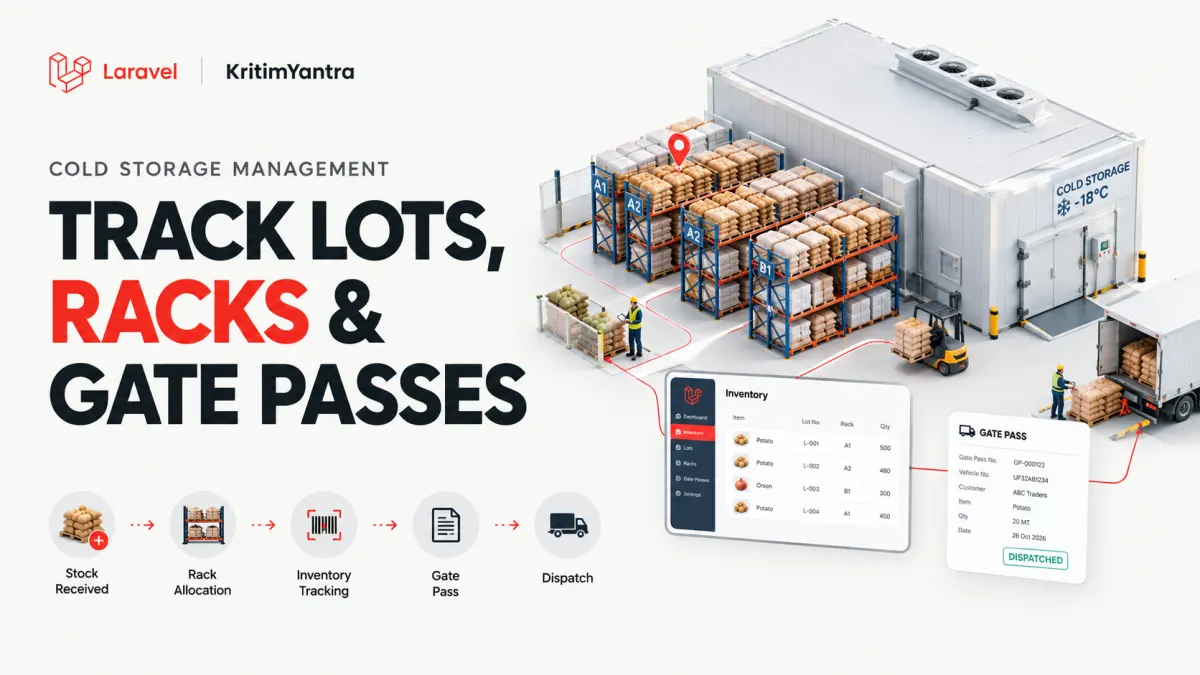
When a customer arrives to collect 60 bags of potatoes, your warehouse team should know exactly where those bags are stored. Nobody should need to search through registers, make repeated phone calls, or guess whether the stock was moved to another rack last week.
That is the goal of cold storage inventory management: a clear record of what came in, where it was stored, what moved inside the facility, and what went out.
Whether you manage a small agricultural cold store or a facility with several chambers, the most reliable approach is to track individual stock lots and every movement, not just a single number labelled “available stock.”
What are lots, racks, and gate passes in cold storage?
These three terms refer to different parts of the storage process:
- Lot: A traceable batch of goods received for a particular customer. Its reference number helps staff follow the goods from arrival to final dispatch.
- Chamber and rack: The physical location where all or part of that lot is stored. A lot can be split across multiple locations.
- Gate pass: A dispatch document used to record and authorize goods leaving the facility, with details such as customer, quantity, vehicle, and driver.
Moving 30 bags from one rack to another is a stock transfer; it does not change the facility's total stock. Sending those bags out to a customer is an outward movement; it reduces the available quantity.
A practical example: Track 240 bags from inward entry to dispatch
Suppose Customer A brings 240 bags of potatoes to a cold storage facility. Here is how a well-organized digital workflow should work.
- Record the inward entry. Enter the customer, commodity, date, quantity, weight (if required), and vehicle details.
- Create a lot number. Give this stock a unique reference, such as
LOT-2027-0042. Keep that identifier throughout the storage cycle. - Allocate the stock. Place 150 bags in Chamber 1, Rack A, and 90 bags in Chamber 2, Rack C. Both allocations belong to the same lot.
- Record an internal transfer. Move 30 bags from Rack A to Rack B. The system should update both locations while leaving the total quantity unchanged.
- Process a partial dispatch. The customer requests 60 bags. Staff release 30 from Rack B and 30 from Rack C, subject to the required authorization and stock checks.
- Issue the gate pass. Record the outward quantities and vehicle details. Once dispatch is completed, the inventory balance must reflect the released stock.
After dispatch, the customer has 180 bags remaining. More importantly, the location record should show 120 bags in Rack A and 60 bags in Rack C, with none left in Rack B.
Why stock movement history matters more than a single balance
A spreadsheet might show “180 bags available,” but that number does not explain how the facility arrived at it. A movement history does.
| Movement | From | To | Bags | Change to total |
|---|---|---|---|---|
| Inward | Outside | Rack A | 150 | +150 |
| Inward | Outside | Rack C | 90 | +90 |
| Transfer | Rack A | Rack B | 30 | 0 |
| Outward | Rack B | Outside | 30 | -30 |
| Outward | Rack C | Outside | 30 | -30 |
| Remaining stock | 180 | |||
Each movement should have a lot reference, date and time, staff or user reference, quantity, and related document number. That history helps managers investigate missing stock, correct mistakes, and answer customer questions.
For adjustments, it is better to preserve an auditable record of the correction instead of silently overwriting earlier stock movements.
Manage split rack allocations without losing stock visibility
One customer lot does not always fit in a single rack or chamber. Facilities may divide stock by available space, commodity condition, or operating requirements.
Good chamber and rack management should help staff identify:
- Which lots are stored in a particular chamber or rack.
- How many bags or how much weight is allocated to each location.
- When stock was transferred and where it came from.
- How much of the lot remains available for dispatch.
- Whether the digital allocation matches the physical stock count.
This is especially useful during peak agricultural seasons, when many customers may store similar commodities across multiple chambers.
Use digital gate passes for accurate outward stock management
A gate pass is more than a printable slip. It connects the customer's collection request to the stock that actually leaves the facility.
A useful gate pass record can include the customer name, lot reference, commodity, quantity, vehicle number, driver details, destination, issue date, and dispatch status.
It is important to distinguish a draft gate pass from a completed stock release. Staff should confirm that goods were genuinely dispatched before treating them as released inventory. If a pass is cancelled, the system's process should prevent an unexplained stock deduction.
KritimYantra's ColdStore Pro Laravel cold storage management system includes lot tracking, split rack allocations, rack and chamber transfers, partial outward quantities, and gate-pass management. These features help connect inward stock records with their later movements and dispatches.
How to prevent errors during partial dispatches
Partial dispatch is common. A customer may store 400 bags and collect only 125, leaving 275 in the facility. The remaining balance must stay linked to the original lot and its current locations.
A reliable workflow should check the requested quantity against available stock before confirming an outward transaction. It should also account for two operators attempting to release the same stock at the same time.
For teams building or customizing inventory software with Laravel, related database updates should be handled together. For example, a rack transfer should subtract stock from the source and add it to the destination as one consistent operation. Laravel documents this through its database transaction functionality.
Important: Transaction handling, simultaneous-dispatch protection, and cancellation rules should be tested in the specific application you plan to deploy; they should not be assumed from a feature list alone.
Daily stock reconciliation: A simple checklist
Even when inventory is digital, staff should compare records with physical stock regularly. A short end-of-shift check can help catch small errors before they become serious disputes.
- Check lots with negative balances or unexpected stock adjustments.
- Review completed gate passes against actual outward movements.
- Check that transfers reduce one location and increase another by the same amount.
- Investigate lots with unclear rack or chamber allocations.
- Review goods stored longer than the agreed period.
- Periodically count selected racks and compare the physical quantity with the system.
Current stock reports, chamber occupancy reports, and exportable movement records can make these checks faster and easier to repeat.
What to look for when choosing cold storage inventory software
Before selecting a system, ask for a walkthrough of everyday situations—not just a dashboard presentation. The questions below are a useful starting point.
- Can one lot be allocated across several chambers or racks?
- Does the system retain a history of inward, transfer, and outward transactions?
- Can a customer collect part of a lot without losing the remaining balance?
- What happens when a gate pass is cancelled or a dispatch is corrected?
- Can staff track activity by operator, manager, or accountant?
- Can you export stock and occupancy reports for reconciliation?
- How does the application handle two users attempting to dispatch the same stock?
These questions matter whether you are running a cold storage business or developing a customized solution for a client.
Frequently asked questions
What is a lot number in cold storage inventory management?
A lot number is a unique identifier assigned to a batch of goods received into storage. It helps staff connect the customer's stock with its quantity, locations, movements, and dispatch history.
Can one lot be stored in multiple racks?
Yes. A lot can be split between different racks or chambers as long as each allocation is recorded against the same lot and the total quantity remains consistent.
Does moving goods between racks change total inventory?
No. A rack transfer changes the location of goods, not the facility's total quantity. Only an inward, outward, or properly documented stock adjustment should change the overall balance.
How does a partial dispatch affect the stock balance?
The quantity actually released is deducted from the available lot balance. For example, dispatching 60 bags from a lot of 240 leaves 180 bags, with the remaining rack allocations updated accordingly.
Why are digital gate passes important?
Digital gate passes create a traceable record of goods leaving storage. They help connect the release quantity with the customer, lot, vehicle, staff, and dispatch details.
Final thoughts: Know what is stored, where it is, and what moved
Accurate cold storage inventory management is not only about knowing today's stock balance. It is about being able to explain how that balance was reached.
When lot numbers, rack allocations, transfers, and gate passes are connected, your team can locate goods faster, handle partial collections more confidently, and investigate stock differences with a clear record.
If you want a ready-made starting point for these workflows, explore the ColdStore Pro Laravel project and source code on KritimYantra. Review the included features, requirements, and license terms to decide whether it suits your facility or development project.
Projects to explore next
Source-code projects from the KritiMyantra catalogue. Check each project's details before buying.

Flask Authentication System (Free Version) - Kritim Yantra
🛠 Features✔ Google & GitHub Authentication✔ User Registration & Login✔ Profile/Dashboard Access✔ Secure & Mi...

Flask Blog CMS with Admin Dashboard — Python Source Code
A Flask-based blogging website with a built-in admin dashboard. Manage articles, images, categories, tags and featured p...

Laravel 12 + ReactJS Starter Kit: Add Multi-Language Support (Arabic, English, Spanish) with Blog CRUD
🚀 Installation & Setup Download & Extract Get the ZIP from kritimyantra.com and extract it. Includes preconfigu...
MySQL 26.10: What's New in REST APIs, Authentication, and Database Performance?
Building a REST API around MySQL usually involves more than writing SQL queries. You need an application server, database connecti...

Vue.js 3.6 RC13: Features, Risks & Upgrade Advice
A new Vue release is tempting, especially when it promises a faster reactivity system and a way to render components without a vir...
PostgreSQL 19: New Features, Performance & Upgrade Guide
Database upgrades are easy to justify when they promise faster queries. They're harder to justify when a production system is alre...
Cold Storage Management Software: 12 Smart Features That Make Your Business Easier in 2027
Running a cold storage business is complicated enough. Managing it shouldn't be.Imagine starting your day without searching throug...
Cold Storage Rent Calculation Made Simple: Per Bag, Monthly & Seasonal Rates
Calculating cold storage rent shouldn't be more complicated than managing the stock itself.But anyone who runs a cold storage faci...
Comments
No comments yet. Be the first to comment.
Sign in to join the discussion.